
In our test, web search found the single figures. It could not screen a sector.
In short. We asked twelve multi-company questions about Japanese listed companies to two assistants from the same model family: Assistant A with web search, Assistant B with Kabuken's MCP server and no web search. With web search, 237 of 245 scored figures matched the filing. But Assistant A read no annual securities report (有価証券報告書) itself, and none of its figures carried a filing document ID: they came from third-party sites, news and results summaries. With Kabuken, 253 of 253 matched, and each figure carried the EDINET document ID of its filing. The largest gap was in sector screens. This is a small test with real limits, and we list them below.
The difference we saw is not whether one figure is right. It is whether the reader can open the exact filing behind each figure, and whether a whole sector can be listed at all.
Why a third round
In round one, three assistants each gave five headline figures for ten large companies. All 150 figures matched the filing.
In round two, one assistant with web search answered harder single-company questions: segments, prior years, smaller companies, the latest period, and Japanese prompts. 40 of 45 items were correct and it fabricated nothing. But it read no 有報 itself for any of its 48 figures. They came from earnings releases (決算短信), company releases, news and data sites, and it flagged most of them as unverified.
So single-company lookups did not separate a web-search assistant from a filing database. Round three asks for what an analyst often wants instead: a table across several companies.
We did not test an assistant that reads the filing itself. Other tests suggest a current model reads single figures well when it has the filing. Our question was what happens when the assistant only has web search.
What we asked
Ten prompts in English: three sector screens, three comparisons of five to seven named companies, two five-year series, and two leverage or margin checks. Two more prompts repeat one screen and one comparison in Japanese. A screen reads, for example: pharmaceutical companies with ROE of 15% or more and total liabilities at most half of shareholders' equity, top ten by ROE, with the source document for each row. The prompts name companies and securities codes only. They do not mention EDINET or Kabuken.
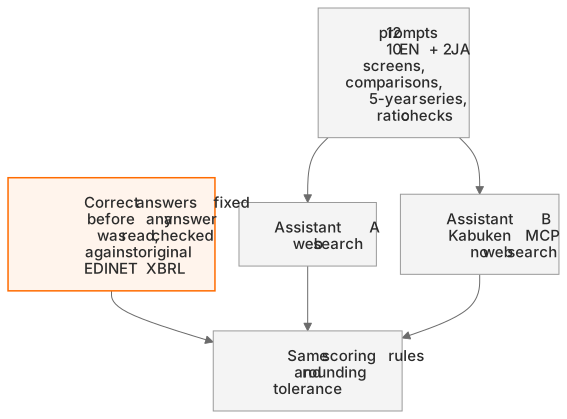
We fixed the correct answers before we read any answer. We built the answer key with Kabuken's tools, which favours Assistant B. So we then checked the key independently against the original EDINET XBRL files, with no Kabuken code on that side: all 364 values in 64 filings matched exactly. Both assistants were scored with the same rules. A figure counts as correct when it equals the filed value within the rounding of the precision it was written in.
Results
| Assistant A: web search | Assistant B: Kabuken MCP | |
|---|---|---|
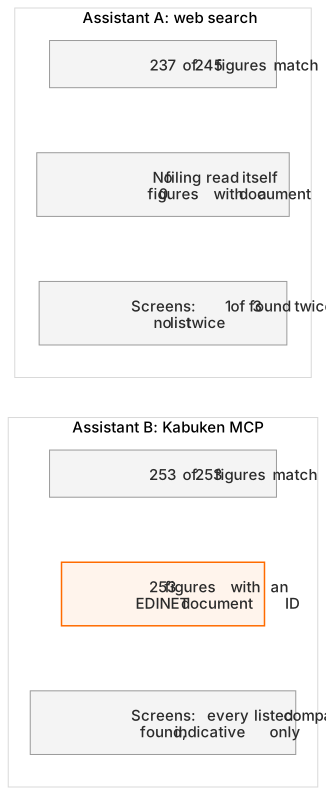
| Scored figures that match the filing | 237 of 245 | 253 of 253 |
| Figures that differ from the filing | 6 (5 asked, 1 extra) | 0 |
| Filed figures not given | 2 | 0 |
| Fabricated figures | 0 | 0 |
| Figures with a filing document ID | 0 | 253 |
| Rankings in the right order | 6 of 6 | 6 of 6 |
| Screen recall (four screens) | 0, 0.33, 0, 0.33 | 1, 1, 1, 1 (indicative, see below) |
| Japanese prompts fully answered | 0 of 2 | 2 of 2 |
Where the gap was: screens
Assistant A said it could not enumerate a sector from the web. It wrote that the web has no sector-wide ranking of these ratios and that it could not open the annual reports of the roughly 100 companies in the sector. That is a limit of web search, not of the model: an assistant that only searches has no list to enumerate from. For the pharmaceutical screen it confirmed one of the three passing companies, in English and in Japanese. For transport equipment and for retail it gave no list. In the transport-equipment answer it wrote in bold "Verified: no company passes both criteria", then narrowed this to the few names it had checked. Kabuken's screen lists five companies in that sector that pass.
Assistant B used Kabuken's screen tool and listed every company on the list of correct answers, in all four screens.
One caution belongs here, not in a footnote. For the screens, the list of passing companies came from Kabuken's own screen. Assistant B used that same screen, so its full recall partly shows that it read the tool correctly. Read the screen numbers as indicative, not as proof. The figures in each listed row were checked against the original filings.
Where the figures came from
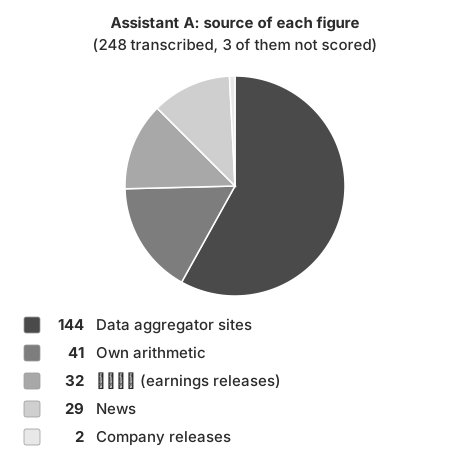
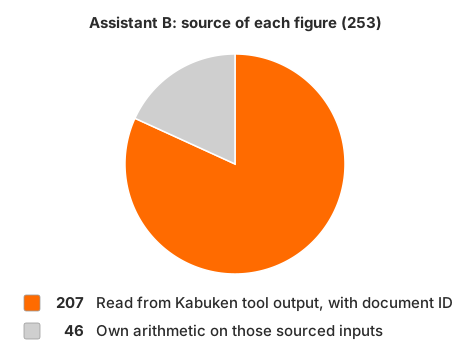
Assistant A's figures came from third-party sites, news and results summaries, plus its own arithmetic. Some of those sites are themselves built from the 有報, but Assistant A read no filing itself and gave no filing document ID. In all twelve answers it said that it had not checked its figures against the 有報. Assistant B read 207 figures directly from Kabuken's tool output and computed 46 from those sourced inputs. Every figure carries the document ID of its filing, so anyone can open the same filing on EDINET. Ten of those figures cite an amended report (訂正有価証券報告書) for one company. Assistant B pointed this out itself.

What web search did well
Assistant A put every comparison in the right order (6 of 6). It invented no figure, and it said plainly where it was unsure. Four of its five differing asked figures were rounding or truncation slips of less than ¥100 million, on figures of hundreds of billions or trillions of yen. For example, it wrote Toyota's revenue as ¥50,684.9 billion against a filed ¥50,684,952 million. The fifth was a different value: NEC's equity ratio as 47.3% against a filed 49.2%. The Japanese prompts were weaker: in the Japanese comparison, two filed equity ratios were left unconfirmed and one was wrong (9 of 12).
What this does not show
- Screens are partly circular. The list of passing companies came from Kabuken's own screen (see above).
- Different harness. Assistant A ran once through an API, with a cap of 15 searches per prompt. Assistant B was run by an agent session that could retry and cross-check. Its two Japanese answers reused the tool results of the English runs.
- Seven days apart. Assistant B ran seven days after Assistant A, against the same fixed answers.
- One model family. Both assistants are from the same model family. The difference shows the data path, not model skill.
- Small sample. Twelve prompts. The named companies are large companies with a March year-end.
- Definitions differ on screens. Screen ROE is Kabuken's own calculation on average equity, not the ROE the company reports. Assistant B said so in each screen answer. A web user rarely gets that basis, so the screens also compare definitions.
- Assistant B's gap. On screens, Assistant B left the securities-code column blank, because the tool returned EDINET codes.
- Not investment advice. Kabuken has no stock prices.
Takeaway
For one figure about one company, web search did well in our rounds. For a table across a sector, web search gave the assistant nothing to enumerate from, and no figure carried a filing document ID. In this run, the filing database answered the same tasks completely, with a document ID for each figure that anyone can check on EDINET.
When to use Kabuken
Kabuken answers from the filings that Japanese listed companies submit to EDINET. Use it to:
- Screen a whole sector from your AI assistant on filed figures and list the companies that pass. Web search has no list of a sector's companies to work through.
- Ask what the annual securities report (有価証券報告書) says about officers and board candidates at the AGM, female managers, male childcare leave, the gender pay gap, major shareholders, owner categories, policy shareholdings, segments and notes, or find any single figure in a filing step by step.
- Check and cite each figure. It comes with the EDINET document ID of its filing, so you can open it.
For one headline figure of a large company, web search usually gets it right.
The tools behind these jobs
Sector screens use screen_companies. Officers and human capital come from get_company_financials (include: ["officers"], ["human_capital"]). Top holders, owner categories and policy shareholdings come from get_major_shareholders. Segments come from get_segment_breakdown. Any single fact, including the notes, comes from get_financial_facts, one level per call or by a query on labels and concept names. Field reference: https://kabuken.intellics.ai/docs/en/api/tools/?utm_source=blog&utm_medium=referral&utm_campaign=2026-11-16-verify&utm_content=docs_tools
Source: EDINET (Financial Services Agency, Japan), Public Data License 1.0. Processed by Kabuken. A Kabuken experiment by Intellics K.K.