
Where are a Japanese company's sites? A map of Japan from the annual report, and the same rows in Claude
An annual securities report (有価証券報告書) lists the plants, offices and stores of a company in one section, 設備の状況. It is a plain list of rows, and for a large company it is long. Since 2026-11-25 Kabuken reads that list for you and shows it on a map of Japan.
Kabuken has two surfaces: the web app at kabuken.intellics.ai and the MCP server that Claude, ChatGPT and other AI clients connect to. Sites are on both, and this post says what each one gives you. Kabuken does not provide stock prices or investment advice. The data is what companies filed.
From filing to map
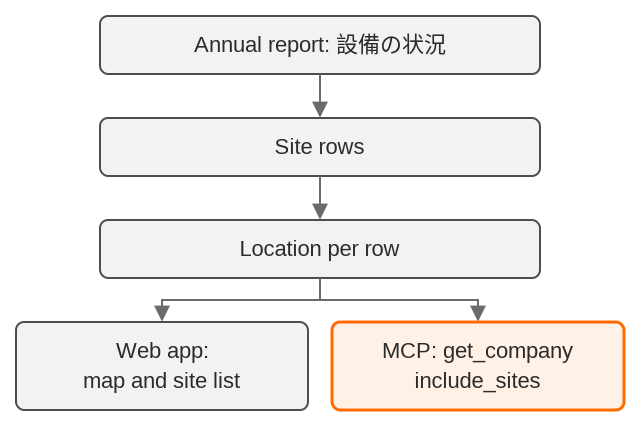
The data comes from the latest annual report that Kabuken has parsed for the company. The section covers the filer and its consolidated subsidiaries. Across the companies we have processed, that is more than 40,000 site rows from about 4,000 filings, and over 97% of the rows carry some location: a municipality, a prefecture, a region or a country.
On the web: the Segments & sites tab
Open a company page and choose Segments & sites, the third of five tabs (Overview, Financials, Segments & sites, Shareholders, Filings).
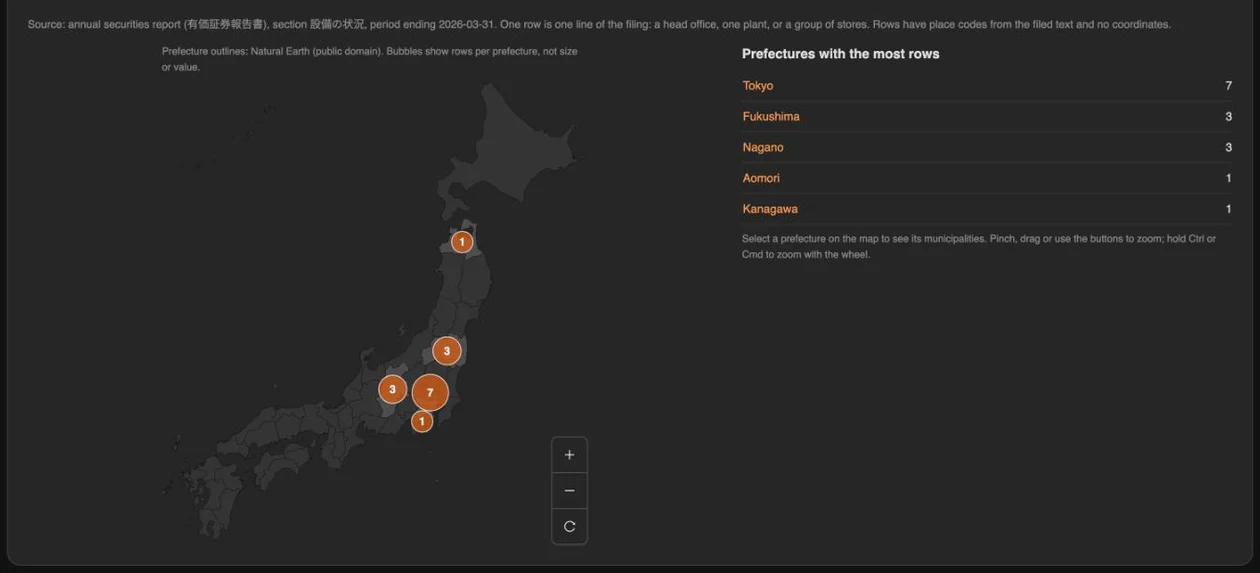
- Map of Japan. One bubble for each prefecture that has sites.
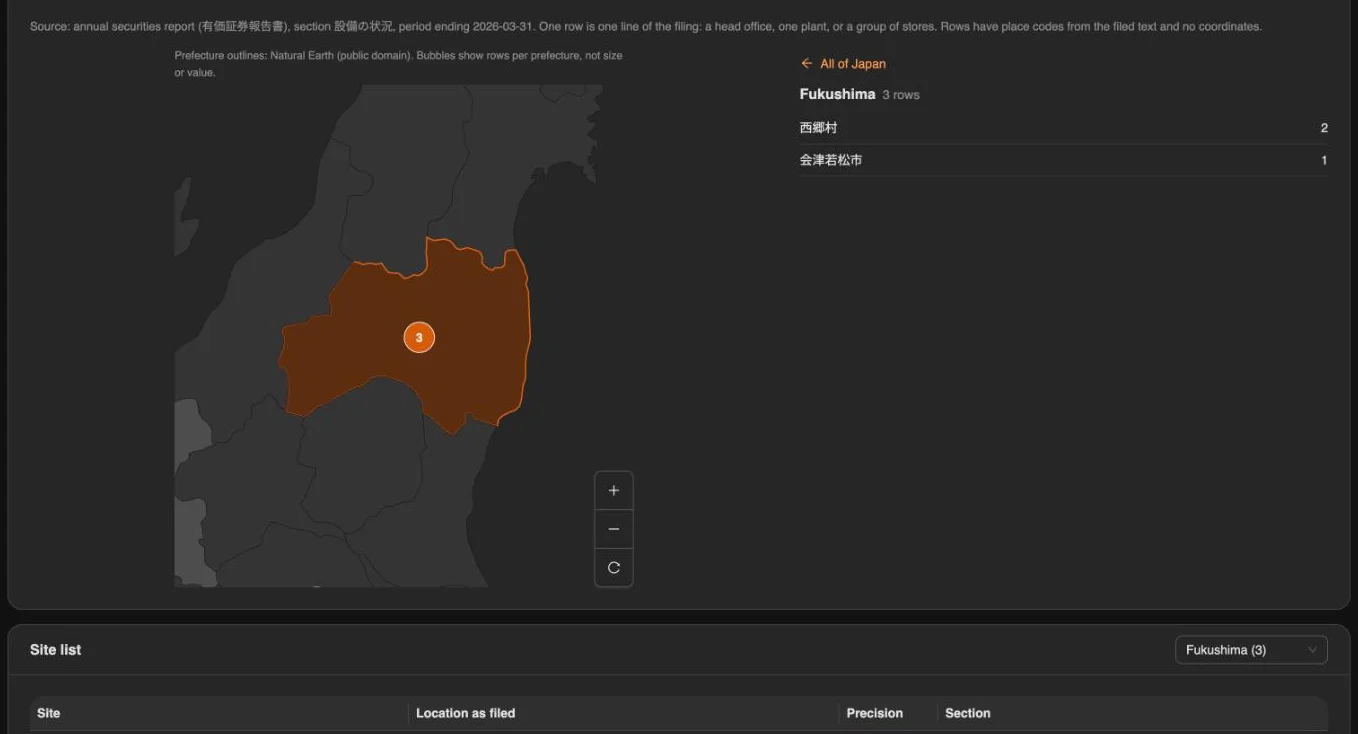
- Zoom. Select a prefecture to zoom to it and to see the number of rows in each municipality.
- Site list. Below the map: site name, location as filed, precision of the location, and the section of the filing. A prefecture filter narrows the list.
- Group tag. A row that stands for several sites, such as "海老名東口店 他19店舗" or a bare prefecture, carries a quiet Group tag.
- Overseas. A summary by country, plus the rows that name only a region or a country. Those rows are not on the map, because the map is by prefecture.
Example: Olympus has 25 site rows in its latest parsed annual report, with Fukushima 3, Nagano 3 and Aomori 1 among the prefectures.
In Claude or ChatGPT: the same rows
Ask in plain language:
"For Olympus, list the sites in the latest annual report by prefecture, and show the filing they come from."
「オリンパスの最新の有価証券報告書にある拠点を都道府県別に出し、出典の書類も示してください。」
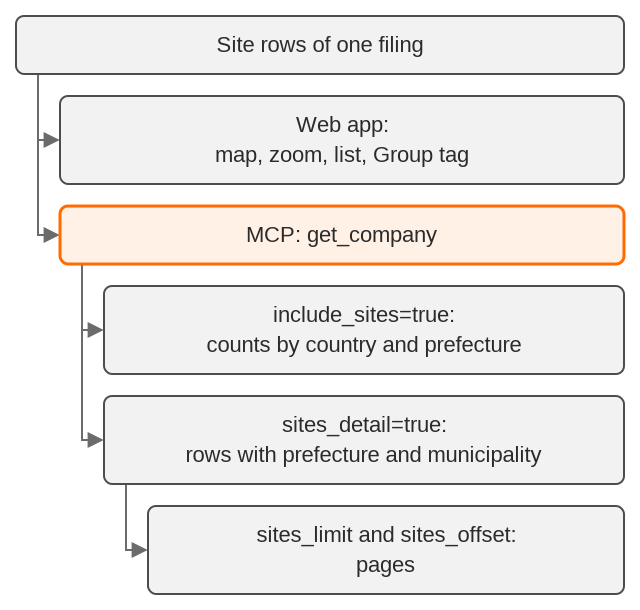
The assistant calls get_company with include_sites=true. Add sites_detail=true to get the rows themselves, each with its prefecture and municipality, and use sites_limit and sites_offset to read a long list in pages. Each row has an is_group flag: it is true when the row stands for several sites. The response names the filing it came from.
What the rows are not
- A row is a line of the filing. It can be a head office, one plant or a group of stores that the company aggregated. A count is not size, book value, headcount or revenue.
- No coordinates. Bubbles sit on prefectures, not on addresses.
- No parsed filing, no rows. If the tab shows a message that no filing was parsed, that does not mean the company has no facilities.
- Not every row is on the map. Rows with only a region or a country, and rows whose location could not be resolved, are listed but not placed on a prefecture.
- Segment tables are not in this tab yet. The Financials tab shows each filing's segment breakdown.
Try it
Web: open a company page at kabuken.intellics.ai and choose Segments & sites. Guide: https://kabuken.intellics.ai/docs/en/guide/financials/?utm_source=blog&utm_medium=referral&utm_campaign=2026-11-sites#segments--sites-tab
MCP: connect Kabuken to Claude or another client, then ask the question above. Setup: https://kabuken.intellics.ai/docs/en/api/connecting/?utm_source=blog&utm_medium=referral&utm_campaign=2026-11-sites
Tool reference for get_company: https://kabuken.intellics.ai/docs/en/api/tools/?utm_source=blog&utm_medium=referral&utm_campaign=2026-11-sites
Release notes: https://kabuken.intellics.ai/docs/en/whats-new/?utm_source=blog&utm_medium=referral&utm_campaign=2026-11-sites
Also new this week
Filings tab and list_documents now include amended shelf registrations (訂正発行登録書) and other filings that EDINET publishes only as PDF; they have no financial figures. The web app has a new navigation (Home, Companies, Portfolio, Events, AI / MCP), and the shareholders tables moved to a Shareholders tab.
What this is not
Sites describe where a company reported facilities. They are not a ranking, a score or a measure of exposure to a region. Check the filing for any decision.
Source: EDINET (Financial Services Agency, Japan), Public Data License 1.0. Prefecture outlines: Natural Earth (public domain). Data processed by Kabuken. Kabuken does not provide stock prices or investment advice.